Specialist Beta - Cyberchaze CTF Writeup
Walkthrough for the Specialist Beta Android reverse engineering challenge from Cyberchaze CTF.
Specialist Beta - Cyberchaze CTF Writeup
Challenge Info
| Field | Details |
|---|---|
| CTF | Cyberchaze CTF |
| Challenge | Specialist Beta |
| Category | Android / Reverse Engineering |
Solution
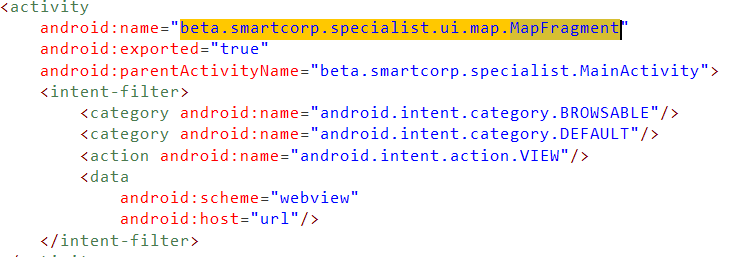
When we inspect the Manifest file,we see ann activity which handles deeplinks
Further, we can check the code of that activity
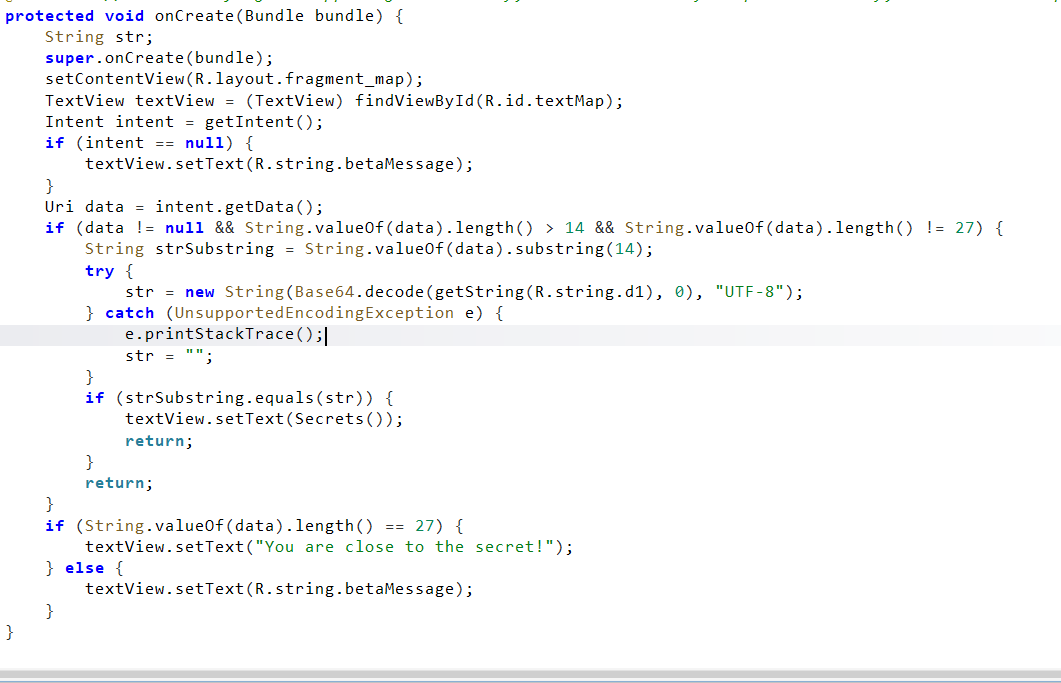
Our intent should have a data uri, the length of it should be more than 14 chars but not equal to 27 And a base64 value is getting decoded, to which a substring of our data uri is being checked We can get that value from the strings.xml file

- base64 encoded value : ZGVlcGxpbmstc2VjcmV0LWludGVudC1kYXRh
- base64 decoded value : deeplink-secret-intent-data
strSubstring will contain the string from the data uri we pass but starting only from the index 14 So the first 14(index 0 - 13) characters of the uri we pass does not matter, to that we can append deeplink-secret-intent-data So, our POC app:
1
2
3
4
5
6
7
8
9
10
11
12
 b1.setOnClickListener(new View.OnClickListener() {
            @Override
            public void onClick(View v) {
                Intent intent = new Intent();
                intent.setAction("android.intent.action.VIEW");
                intent.setComponent(new ComponentName("beta.smartcorp.specialist","beta.smartcorp.specialist.ui.map.MapFragment"));
                Uri data = Uri.parse("11111111111111deeplink-secret-intent-data");
                intent.setData(data);
                startActivity(intent);

            }
        });
And then we get the flag,

Flag
1
flag: cyberchaze{prot3ct_deeplink$_You_F0uNd_tHe_fl3g}
This post is licensed under CC BY 4.0 by the author.